In Sitecore Experience Analytics you can see graphs and tables with data of visitor information such as pages they most navigate to, goal conversions etc.
By default these tables have no sorting set on a specific column. This in turn leads to intense scrolling through the result.
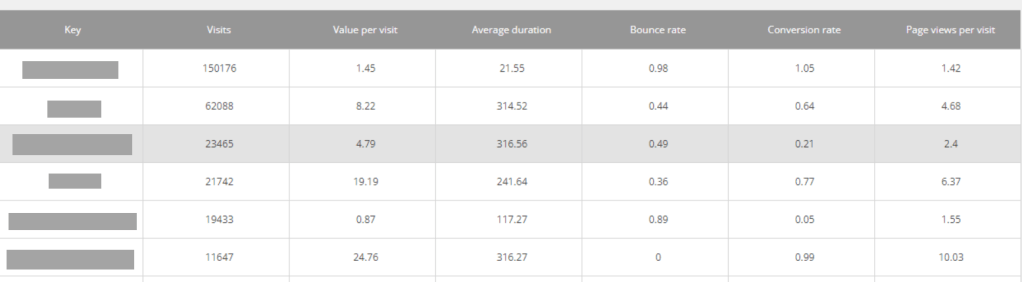
If you want to sort the tables by for example Visits in descending order, i’ll show you how. Same idea if you want to switch Visits for Page Views, Conversion Rate etc.
- Log into Sitecore and go to Desktop from the Dashboard.
- Switch to Core database
- Open Content Editor and navigate to /sitecore/client/Applications/ExperienceAnalytics/Dashboard.
- From here you need to find the tables you want to fix the sorting.
As you can see in the image below, the tree in Content Editor matches the order in Experience Analytics.
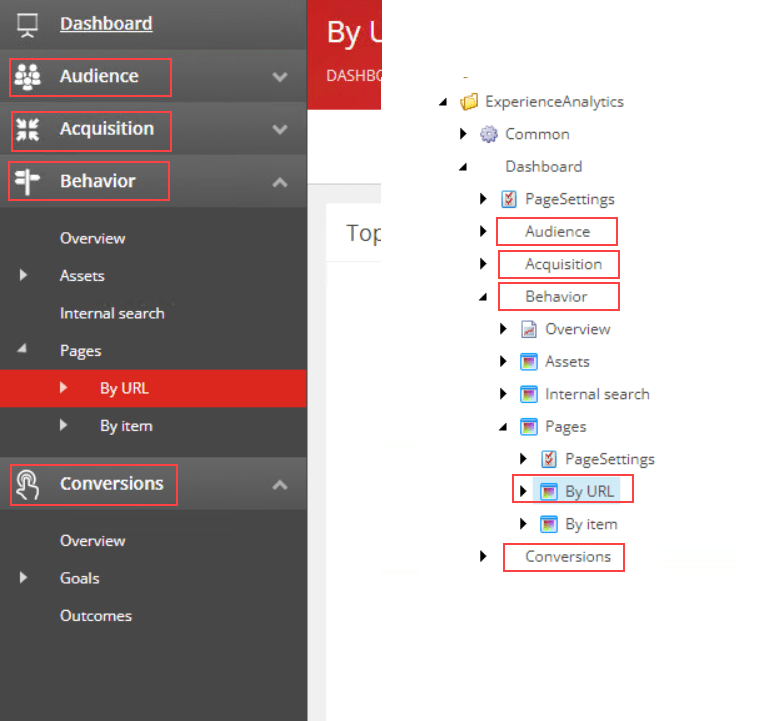
5. Now open the coresponding nodes PageSettings and click the ListControl Parameters.
Find the fields KeysSortByMetric (the column) and KeySortDirection.
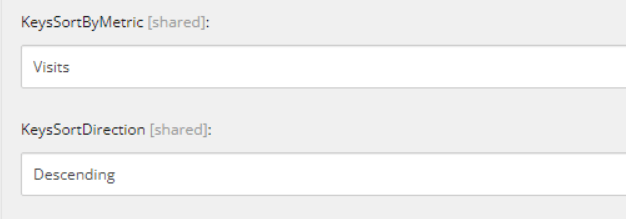
Save and refresh your Experience Analytics window and the table should now be sorted.
Link to Sitecore documentation for Dimensions and Metrics and what the they mean: Click
 Sitecore Tackled