Replace non-english characters

I needed to replace swedish characters from string without removing the character for itemname.

With Sitecore you can use ItemUtil.ProposeValidItemName() but it removes the invalid characters.
I have a text like “Flöde” and I want it to be “Flode” and not “Flde” like Sitecores ItemUtil does.

Then I can use the following code:

byte[] b = Encoding.GetEncoding(1251).GetBytes("Flöde/");
string output = Encoding.ASCII.GetString(b);

string validItemName = ItemUtil.ProposeValidItemName(output);

________________________
output: "Flode/"
validItemName: "Flode"

The ItemUtil.ProposeValidItemName will give you a valid item name for Sitecore.
The string output would still contain possible invalid special characters that you don’t allow in the Sitecore config setting ItemNameValidation regex.
Custom caching with Sitecore Cache

Performance is key. We have all know this. Customers has very high expectations on fast solutions. And this is where caching is king.

There are many caching soultions out there today, like Reddis cache. You can also build your own layer if you’d like. Or you can use Sitecores.

Sitecore has their own caching framework that is used for Sitecore to get data faster. This can also be used for custom caches. So you can cache something simple as a string or even anonymous objects.

There are two types of cache you can use for customcaching.

Sitecore.Caching.CustomCache<string> and Sitecore.Caching.Generics.Cache<T>. One takes a string and one takes an object type.

Sample code

   var mycache = new Sitecore.Caching.Cache("test cache", 1024);
   mycache.Add("key", "data");

   var myType = new Type {Id = 1, Name = "Test"};
   mycache.Add("type", myType);

   //Get the value based on key
   var value = mycache.GetValue("type");

Read more:

http://sitecore-community.github.io/docs/documentation/Sitecore%20Fundamentals/Caching/

Sitecore Solr – Select specific fields with LINQ to Sitecore

If you’re expecting a lot of results from a Solr query, it can be quite a perfomance hit.
If you then only really need 1 or 2 fields from the document, there is a neat way with LINQ to Sitecore to select only the fields you need.

var items = searchContext.GetQueryable<BaseSearchResultItem>().Where(i => i.TemplateId == <templateid>).Select(i => new { i.Heading, i.ItemId }).ToList();

By using the .Select() you can specify which fields you want to get from the document.
This query will result in a Solr query like following:

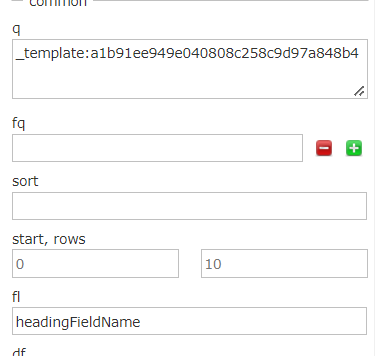
?q=(_template:(<templateId>))&start=0&rows=1000000 &fl=headingFieldName,_uniqueid,_datasource&fq=_indexname:(sitecore_master_index)

In Solr it’s called “Field List” or “fl” and in Solr UI you can test the effect before compiling your code like this, which I prefer to do.

Good luck with your Sitecore Search.