In part 1 I want to introduce you to Sitecore OrderCloud and how to get going with Next.js JSS.
I started my OrderCloud journey this year and wanted to share with you what I’ve learned.
In this part I will share some insights I have about why to choose OrderCloud, who is it right for, both as developer and for your customers, what questions did I have and how did I come to a conclusion about them. In the upcoming parts I will show you how to setup a Next.js application with JSS and Sitecore and the OrderCloud SDKs, so follow me on social media or my blog to keep yourself updated on upcoming posts.
What is OrderCloud?
Let’s start with an introduction on Sitecore OrderCloud. What is OrderCloud? It’s an API-first, headless commerce platform that offers flexibility, scalability, and customization to help businesses build unique and innovative eCommerce experiences. Sitecore OrderCloud uses MACH architecture which stands for
- Microservices: Microservices architecture breaks down applications into smaller, independent processes that communicate with each other. This allows each service to be updated or scaled independently, increasing the flexibility and resilience of the application.
- API-first: Meaning it’s designed around the API being the model for the product.
- Cloud-native SaaS: Cloud-native refers to applications that are built for the cloud, taking full advantage of cloud computing architectures. They can scale up or down as needed.
- Headless: Headless architecture separates the frontend and backend of an application. This decoupling allows developers to make changes to either side without impacting the other. It also lets developers use the same backend for different frontends for example.
MACH architecture enables businesses to choose the best-of-breed tools and easily add, replace, or remove them in the future. This is often crucial for your customers success story and a leap away from the monolithic platform we’re used to and gives huge flexibility to the customers. If OrderCloud uses MACH you can be positive that they’ll always have a modern and up to date solution with the ever changing landscape of commerce.
Sitecore OrderCloud is a pure headless platform that makes it completely language agnostic, meaning you can use whatever programming framework or language you want. As long as you can handle HTTP requests you’re good to go
OrderCloud is:
- Product visiblity – what the customer can purchase
- Order distribution – capturing and fulfilling orders
- User segmentation – managing customers
OrderCloud is NOT:
- CRM
- Warehouse management system
- Tax calculator
- Solution for shipping, payments, personalization, email marketing, and frontend
- – so all of these things are integrations you need to add if needed. For instance payment integration when an order is placed. Or while OrderCloud supplies simple email on certain events, it’s still limited and you might want to integrate an email system like Sendgrid for example to fit your customers needs.
Is Sitecore OrderCloud right for you?
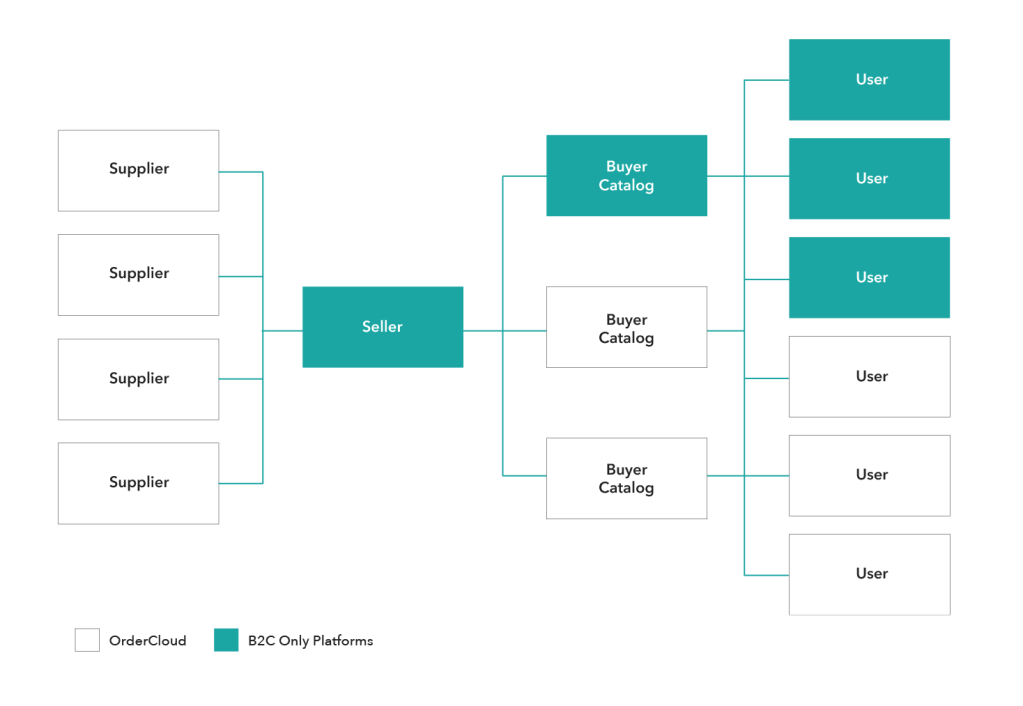
That’s a great question, and this is where OrderCloud shines in my opinion. It is designed to handle B2B, B2C and B2X commerce scenarios. They can be the most basic B2B setup or a complex solution with lots of customization that fits exactly the needs of your customers.
When I started looking into OrderCloud and got to know the platform you can see that it gives an enormous flexibility and can cover any cases that your customer needs. Because if there’s one thing we all know, it’s that each customer’s commerce solution always have their own way, their own third party systems that need integration and their own preferences for pretty much everything. And here OrderCloud gives you that ease of use with for example Integration events or Webhooks to run custom code or make requests to third party applications before or after API calls to OrderCloud. And there’s Connectors in Sitecore Connect to easily integrate with external systems.
With the pace at which technology is advancing, it’s crucial for businesses to choose platforms that aren’t just relevant now but will remain so in the foreseeable future.
It takes into account the unique needs of every business, ensuring that integrations, customizations, and operations run smoothly. So, if you’re thinking about which platform to choose, OrderCloud is certainly worth considering.
How to get started?
First, you start by creating an account on https://portal.ordercloud.io/. It’s free and you get a sandbox environment where you can play around with the API and test all the features, invite your team members without any limitations. You can create a new marketplace in five regions at the moment but when you have a case for OrderCloud just contact their team and they will help you setup one for your region.
It really helped us to have an open and free sandbox so every developer can get a feeling for the API and how it all connects and works. I really recommend you to make an account and try it out. It can also help spark new ideas.
Second, implement Headstart.
Headstart are solutions built on OrderCloud, by the OrderCloud team, to help you kick-start your commerce projects.
It’s an opinionated solution and you need to build on this to fit your specific needs or your clients needs, but it will get you, as it’s name, a headstart with the project. There are 2 headstart projects, both on Github, the links are down below. One is a .NET and Angular and the other is a pure Next.js solution. In this part series we will take a look at how to do this with Next.js.
If you’re not familiar with Next.js, in short, It’s a popular React framework developed by Vercel that enables server-side rendering (SSR), static site generation (SSG), and other advanced web development features.
The Headstart solution in .NET and Angular has 3 main components:
- The middleware: This is built on .NET 6, maybe they’ve now updated it to Net 7, i’m not sure, and gives you the project on how to integrate Sitecore OrderCloud with various third-party tools or applications to create a more comprehensive solution.
- Buyer: The frontend buyer application, where customers visit to buy products, which is built on Angular. It gives a complete shopping experience from the perspective of the buyer user. This includes browsing products, adding them to the cart, checking out, manage account information etc.
- Seller: The frontend admin application, which is also written in Angular. This is the backoffice, where sellers and suppliers can manage the products, customers, orders and other administrative tasks. This is not always required. Some customers already have a third-party system which they use to handle their products, like a ERP or PIM. In which case you would let the customers use that and you just handle those changes through your middleware to connect OrderCloud with those systems.
https://github.com/ordercloud-api/headstart
At the moment, you only get the Seller Admin application in the Next.js headstart. Sitecore has confirmed their focus will be on this project going forward, which might give some help determining what headstart to choose.
https://github.com/Sitecore/Sitecore.Commerce.Headstart.ReactAdmin
Both headstarts are available on github, you can download it and also contribute to it if you want.
Must I use Headstart?
No. It’s just as common to make your own project from scratch. It all comes down to what your customer needs and what fits your developer team.
I decided to use the Headstart as a base template that will be extended and built-upon for customization. So it’s basically a fork of the Next.js headstart and i’ll continuously merge changes as they come in to the master branch from Sitecore. So it’s important to only extend and not replace anything from the branch to not break anything down the line.
Do I have to use Sitecore XM/XP with OrderCloud?
Nope, yet again, the power of everything being headless is that you don’t need to. But Sitecore has obviously made it easier and give more features that works with their other products. Like Sitecore Send, Search, Discovery etc.
You can use Sitecore OrderCloud completely standalone.
If you have a customer which already has Sitecore XP, for instance, you can utilize that with JSS. So you can use data from Sitecore that is decoupled and with a Next.js storefront and a NET 6/7 in our middleware.
JSS, or it’s new name Sitecore Headless Services module, “..enables developers to decouple the data application from the rendering application”[1]. It allows for headless development with Sitecore and Javascript applications. Sitecore provides JSS SDKs for this also.
Next.js Headstart and JSS
Based on your client and their needs, imagine you decide to make a NextJS JSS app which uses the OrderCloud javascript SDK as your buyer application. The client already has a Sitecore XP and they have a relatively short time-to-market for the initial phase.
This approach lets you take advantage of various Sitecore features the client is already familiar with, such as Forms, components, data storage solutions, and the experience editor, among others. The headless nature of Sitecore may seem intimidating initially, but once set up, it offers a swift and user-friendly experience.
Now, think about the backoffice. Visualize using a base like the Headstart for NextJS, which employs the OrderCloud SDK. This can be tailored further based on the client’s unique requirements. You could fork the Headstart backoffice project to extend upon as you wish to get going faster.
You can easily deploy this all on Vercel and there are several guides and videos in the Sitecore community on how to get started with Vercel.
Lastly, think about middleware. Consider leveraging Azure functions or microservices to process requests to external systems. This can be for various purposes such as calculating tax, providing shipping and payment options, updating inventory, and more.
What are the challenges of using OrderCloud?
Ordercloud gives you an enormous option for customization and flexibility, but if you’re new to Ordercloud, there’s a lot of work to do yourself that isn’t provided by the platform. This means a steep learning curve, but a better reward in the end.
To cope with that, I was using the knowledge base and Learn path on the OrderCloud site. Next, I went to the courses on OrderCloud at learning.sitecore.com, and then doing the Certification was enough to get me going. So, all in all, I think it’s not that hard if you’re familiar with working with APIs and have a grasp of eCommerce. And obviously using the Headstart projects to your advantage.
As long as you’re familiar with the challenges you can weigh those against the pros of using it.
Stick around for part 2 where I’ll give a demo on how to setup a NextJS JSS app and the NextJS headstart project.
 Sitecore Tackled