The latest release of Sitecore XM Cloud introduces several exciting new features designed to enhance content management and optimization. Here’s a summary of the key updates:
Content authoring improvements
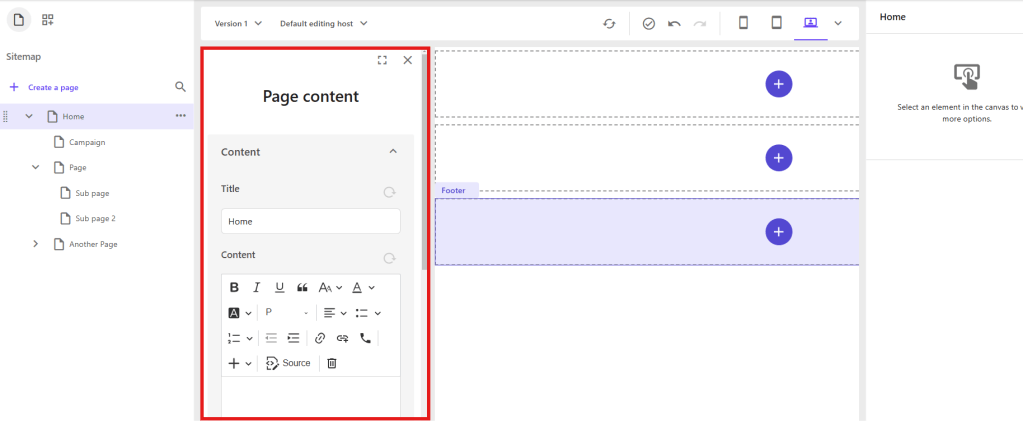
1. Direct Editing: You can now edit all written content on your page directly within the Page Builder. This includes content fields associated with the page itself, such as metadata, which can be edited in the Page Content pane. Maybe you have a Multilist Tag template on your page, then you can do those things from Page Editor now, which is great!
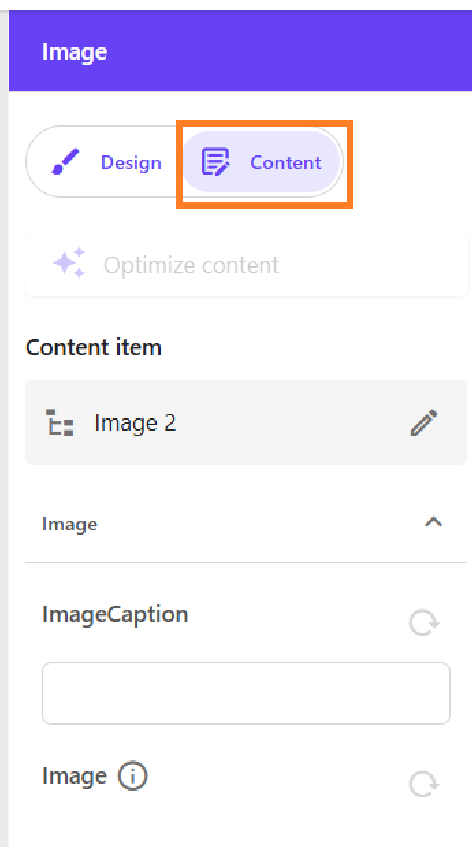
2. Component Editing: Edit content item fields included in a component by selecting the component and using the Content tab in the right-hand panel. Before we only had the Design tab. Useful for changing component data fields without going to Content Editor if it’s fields that aren’t visible or supported.
Enhanced Field Editing: The Page Builder now supports editing various field types, including File, Droplist, Droplink, Droptree, Taglist, Checklist, Multilist, Treelist, Multiroot Treelist, and Checkbox. General link fields also support email links. This has been a long requested feature as we want to move editors away from Content Editor and just use Page Editor as much as possible.
Automatic Saving: All content edits are automatically saved and immediately displayed. Undo and Redo buttons are available for as long as you remain on the edited page.
Sitecore Stream Integrations
This new Sitecore product surely deserves its own blog post. Sitecore’s new AI product is designed for marketers to boost productivity and assist with on-brand campaign ideas.
In XM Cloud, with a Sitecore Stream subscription, marketers can set up brand kits. These kits allow them to define rules for the AI, including
- Logo
- Visual Guidelines
- Global Goals
- Brand Context
- Dos and Don’ts
- Tone of Voice
- Checklist
- Grammar Guidelines
- Image Style
These rules then enable the AI to help editors ensure that new content adheres to the brand guidelines. For example, the AI can generate a text prompt using the defined rules, creating a draft that editors can accept, regenerate, or modify.
https://doc.sitecore.com/xmc/en/users/xm-cloud/sitecore-stream-in-xm-cloud.html
You can use Sitecore Stream to help with A/b testing and personalize pages for visitors in XM Cloud.
To enable Sitecore Stream with Rich Text Editor(RTE) in Page Editor you need to upgrade to the new RTE.
https://developers.sitecore.com/changelog/xm-cloud/13112024/the-legacy-rich-text-editor-in-pages-will-be-deprecated-on-may-8th%2c-2025

 Sitecore Tackled