Sitecore docs AI and MCP

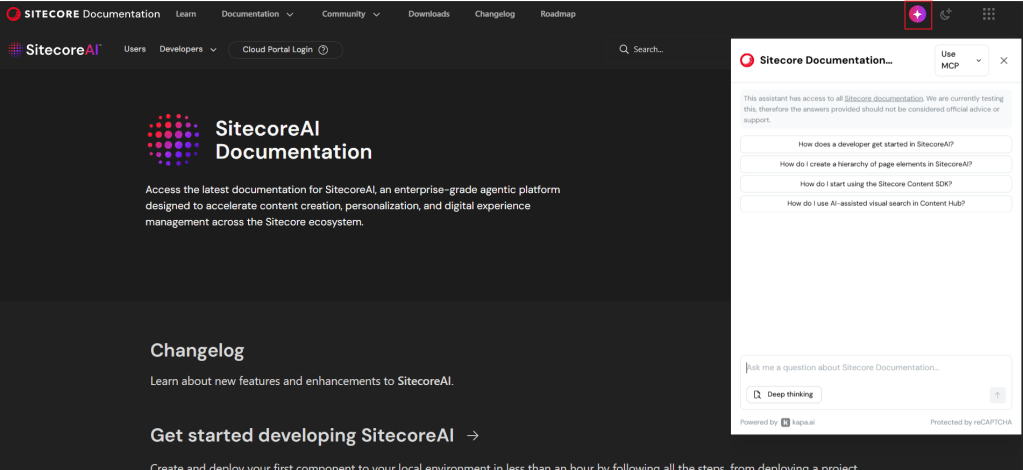
Did you know Sitecore Docs has a new AI feature that you can talk with a LLM chat that has been trained on the Sitecore documentation?

Just go to https://doc.sitecore.com/ and press the Icon in the header, marked in the picture, and you can start asking it questions.

Sitecores documentation has greatly improved the last years, not only in quality, but also in quantity. Sometimes it can be hard to find the right place to look at. And with this AI chat tool you can find answers fast!

There is also an MCP server you can connect to.
To add the MCP to your VS Code you can do following, or Cursor etc:
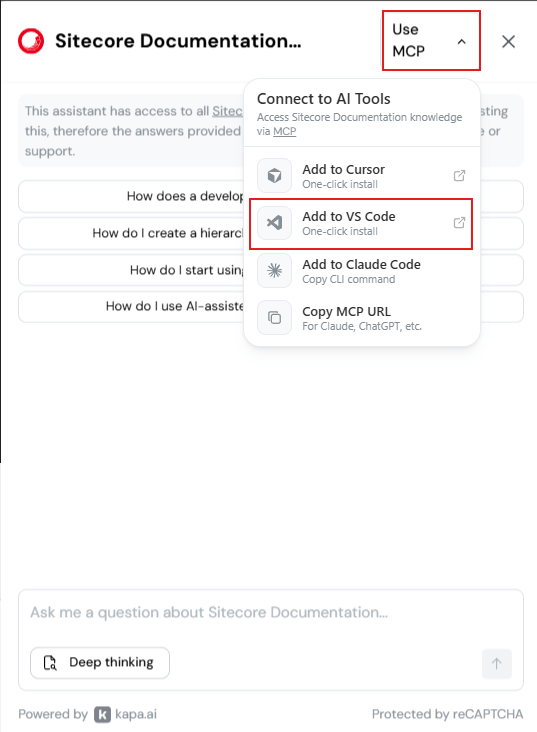
You can now also use the MCP in context with your code repository to get even more context for your question.

A short post but it gives huge impact, and fast!

NOTE from Sitecore:
“This assistant has access to all Sitecore documentation. We are currently testing this, therefore the answers provided should not be considered official advice or support.”

Sitecore JSS tracking CORS origin errors

We’re running a vercel site with Sitecore 10.3 and JSS. I was getting errors about CORS origin like this:

Access to XMLHttpRequest at ‘https://{host}/sitecore/api/jss/track/event?sc_apikey={key}’ from origin ‘https://{host}’ has been blocked by CORS policy: Response to preflight request doesn’t pass access control check: It does not have HTTP ok status

So the JSS tracking wasn’t working. Started to dig in the Sitecore documentation on the tracking API and CORS origin but gave no answer to the problem:
https://doc.sitecore.com/xp/en/developers/hd/20/sitecore-headless-development/jss-tracking-api.html

https://doc.sitecore.com/xp/en/developers/104/sitecore-experience-manager/cross-origin-resource-sharing–cors-.html

Finally I found that the error was thrown because Sitecore.JSS.TrackerServiceEnabled is disabled by default. By setting it to true with a patch config the error disappeared.

<configuration>
  <sitecore>
    <settings>
      <setting name="Sitecore.JSS.TrackerServiceEnabled" value="true" />
    </settings>
  </sitecore>
</configuration>