Sitecore OrderCloud has been a game-changer in the B2B eCommerce landscape. With its headless, API-first approach, businesses have the flexibility and scalability they need to meet their unique requirements. A significant feature in OrderCloud is the concept of Extended Properties, also known as XP.
What are XP Fields?
XP fields, short for Extended Properties, are a unique feature in OrderCloud’s API which are essentially extra fields in an OrderCloud resource, like Order, Product, PriceSchedule, etc.
They allow developers to store custom data alongside the standard properties of an object. XP fields are basically a JSON object that can be added to most resources within the platform. These fields can be as complex or as deeply nested as you need, providing great flexibility in the kind of data you can store.
Benefits of XP Fields
The beauty of XP fields lies in the flexibility it provides. With XP fields, you can create a custom solution tailored to your specific needs. XP fields can store any key-value pair, including numbers, strings, booleans, arrays, and even other objects.
In addition, XP fields are also available for filtering, sorting, and searching on all list endpoints. This makes XP fields just as accessible as normal fields.
What to Store
What you choose to store in XP fields depends entirely on your specific use case. This might include custom user data, additional product information, or order details, for example. As we already know, XP fields are useful when you need to store data that does not fit into the standard OrderCloud data model.
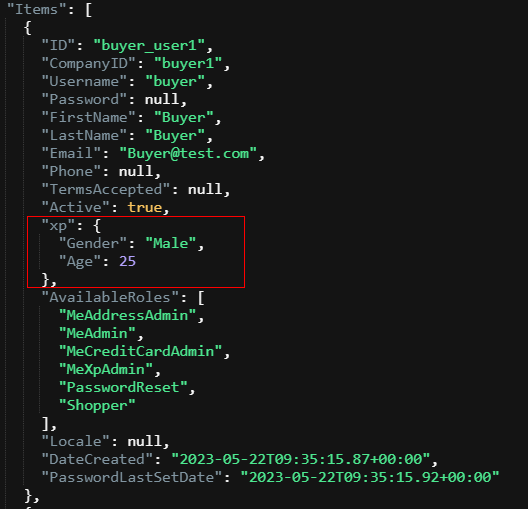
Consider, for instance, that you want to store additional details about users such as age, gender, or specific employment details. With XP fields, you can add this data directly to your user’s data model. The ability to nest objects within XP fields makes it possible to store more complex data structures.
What NOT to Store
While XP fields are incredibly flexible, it is important to note that they should not be used to store sensitive information such as credit card numbers, social security numbers, or passwords. This violates the rules of the platform.
And obviously you shouldn’t store data that’s already taken care of by the standard OrderCloud data model.
Another crucial point to remember is that the entire XP object must be 8000 bytes or less, and each key in the XP should be consistently typed per object. This means that if you add a key with a specific type of value, all other entries with the same key should have values of the same type or be null. So you can’t use user.xp.Age = 25 as int on one user and user.xp.Age = “twenty-five” as string on another user. They need to be the same type.
How to Add XP Fields
Adding XP fields to a resource is a straightforward process. When creating or updating a resource, simply include an “xp” key in your JSON request body, with its value being the JSON object containing your custom properties.
Here’s a simple example of updating XP fields on a user:
PATCH https://api.ordercloud.io/buyers/{buyerID}/users/{userID}
{
   "xp":
    {
       "Gender": "Male",
       "Age" : 26
    }
}
The XP fields have been added or updated to the user’s data model as a “Gender” field and an “Age” field.
Hopefully you understand what XP fields are and when to use them. They are a perfect tool to customize your solution in any way you see fit 🙂
 Sitecore Tackled